
TL;DR
- AI review reads changes against surrounding project context and flags logic errors and missing checks. Static analysis and linters cover different ground — configure the tool to skip what they already catch.
- It needs enough context to be right. A missing access check may already be enforced in middleware, so every finding is a claim a developer has to confirm and test.
- Authorization, payments, and migrations stay with a human reviewer. Business rules that live outside the repo aren't visible to the tool, and its suggested fixes need the same scrutiny as any other code.
- Pilot one repo in comment-only mode with a specific question, on your own PRs, mixing known defects with correct code. Measure confirmed useful findings, review time, and post-merge defects over 60-90 days.
- The real risk isn't a missed bug — it's a team reading the AI's silence as proof the code is fine.
AI code review is worth testing when pull requests spend too long waiting for feedback. If AI helps your team write code faster, your review process needs to keep pace.
According to GitHub’s Octoverse 2025 report, the number of merged pull requests grew by 29% year over year. Each change needs to be checked against the requirements and assessed for its impact on existing code.
AI code review uses large language models to analyze proposed changes alongside available project context. The tool leaves comments for a developer to check before merging. This article examines what it can catch, how to choose a tool for your team, and how to run a pilot that reveals its benefits and limitations.
What is AI code review, and how does it differ from static analysis?
AI code review uses a language model to assess code changes against available project context and team instructions. It can examine a changed function alongside its callers in other files and explain where the change might break expected behavior. To do this, it needs access to the relevant files and requirements.
Static code analysis examines code without executing it. Its capabilities vary by tool: a linter flags rule violations, while more advanced analyzers track data flow and detect vulnerabilities. For example, CodeQL can trace how potentially unsafe data is used throughout a program.
These approaches overlap in what they can detect. The table below shows the role each plays in reviewing changes.
When choosing code quality tools, check which areas are already covered and where gaps remain. If a linter handles formatting, for example, configure the AI reviewer to focus on logic errors to avoid duplicate comments.
How does AI code review work on a pull request?
An AI reviewer analyzes changes alongside available project context and posts findings for a developer to check. Depending on the integration, automated code review can run when a pull request is opened or updated, on request, or through CI.
From the initial trigger to the review comments, the tool goes through several steps:
- Gather the changes and context. The tool retrieves the diff—the differences between code versions—and the material needed to assess it. If a function’s response format has changed, for example, the reviewer needs access to the code that consumes that response.
- Analyze the code and assess findings. The model looks for potential problems using the available files and team instructions. The system may also assess severity and remove duplicate findings. In Cloudflare’s implementation, a coordinator handles this work by consolidating results from specialized reviewers.
- Post feedback on the PR. Comments appear alongside the relevant lines of code. Some tools also suggest fixes, which developers should verify before applying.
This code review automation runs alongside tests and static analysis in CI. A human reviewer examines the code and the check results, then approves the changes or requests revisions.
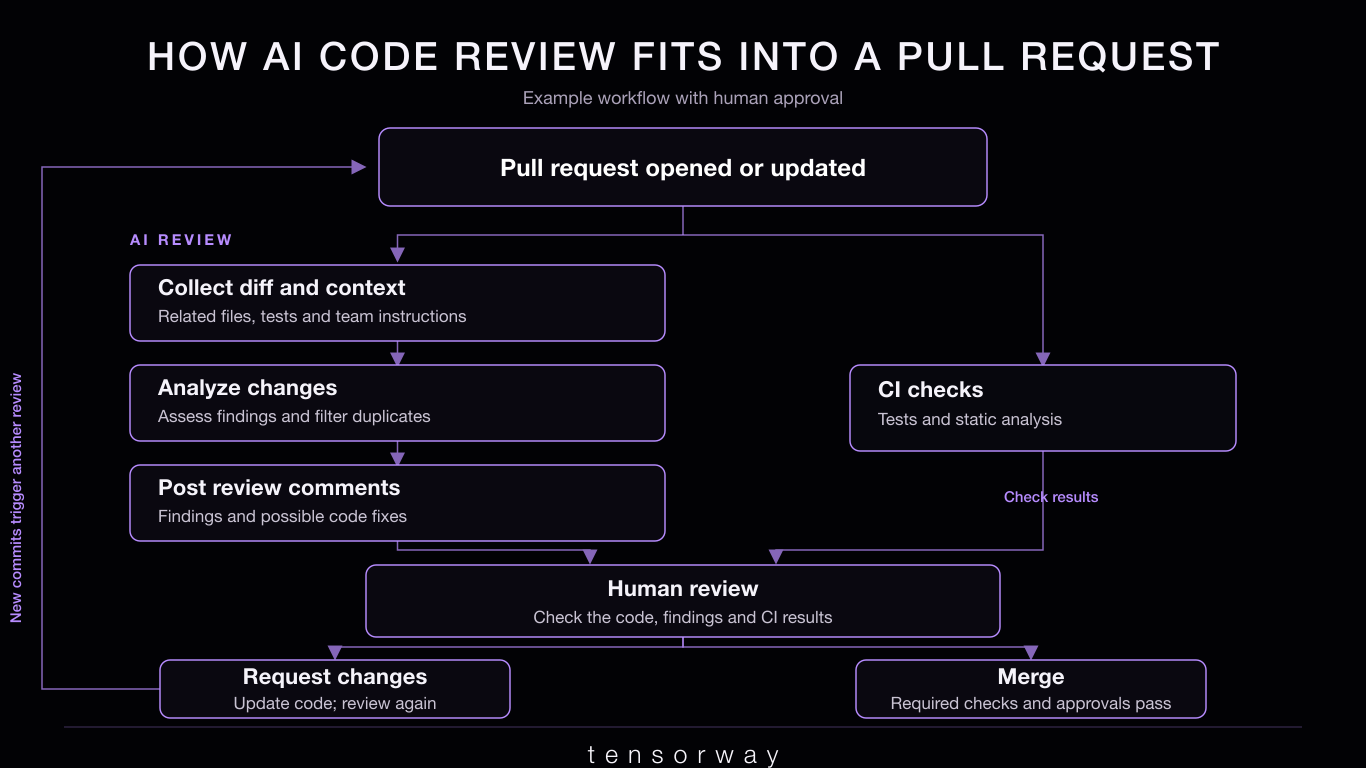
When the PR is updated, checks run again according to the configuration. The repository’s requirements must be met before merging; an AI review with no findings does not, by itself, establish that the changes are ready.
What can AI code review catch, and what still needs a human?
AI review can flag logic errors and missing checks when it has enough context about the changes. A developer needs to confirm the finding and verify that the proposed fix meets the product’s requirements.
Which defects can AI flag before merge?
Consider an endpoint that returns an invoice by its ID. The code checks whether the user is logged in but does not verify that the invoice belongs to their organization. The request succeeds, potentially exposing another organization’s data.
An AI reviewer might flag the missing access check. To substantiate the finding, it needs to inspect the surrounding code: middleware or the database query may already enforce access restrictions. If the tool only sees the modified endpoint, its comment could be a false alarm.
In this illustrative example, a useful review comment might read:
“The query retrieves the invoice by ID alone. Unless access is restricted elsewhere, a user could read another organization’s invoice. Add a test to check this scenario”.
The developer should reproduce the request as a user from another organization and verify that access is denied. After applying the fix, they should also check that an authorized user can still retrieve the invoice.
Which decisions should stay with a human reviewer?
A human checks the change against business rules that may not appear in the repository. An accountant, for example, might be allowed to view invoices across several legal entities. Restricting access to a single organization could address one risk while breaking a legitimate workflow.
Changes to authorization, payments, and data migrations should go to a reviewer who knows that part of the system. Applying code review best practices also means checking AI-suggested fixes: they need the same scrutiny and testing as any other code.
Which AI code review tools should you compare in 2026?
As of September 2026, CodeRabbit, GitHub Copilot code review, Greptile, Qodo, and Sourcery are worth including in a comparison of AI code review tools. Your initial shortlist depends on your Git platform, the context the reviewer needs, and how closely you can tailor its checks to your team’s rules.
The table below can help you narrow the options for a pilot. These use cases overlap: support for a feature does not establish how well a tool will perform on your code.
An existing Copilot subscription makes it a convenient candidate for an initial trial, but check your organization’s budgets and settings. For other tools, review usage limits and confirm that your chosen plan includes the features you need. Check support for cloud and self-hosted versions of your Git platform separately.
To identify the best AI code review tools for your team, compare them on the same set of pull requests. Include changes with known defects alongside correct code to assess both useful findings and false alarms. Record how much time developers spend checking the comments: even a fast automated response can create more manual work.
How do you roll out AI code review without disrupting your workflow?
Start with one active repository in comment-only mode and check whether the tool reduces manual work. Keep existing tests and approval requirements in place while the team assesses the quality of its findings.
What belongs in your code review checklist?
Before starting the pilot, agree on what the tool should check and how the team will handle its findings. Include these items in your code review checklist:
- Code access. Define which repositories the integration can access and what permissions it needs. Check which data is sent to the provider and how it is stored.
- Review rules. Give the tool your team’s established conventions. Disable comments that duplicate formatter or linter checks.
- Merge-blocking criteria. Agree on which confirmed issues must be fixed and which suggestions developers can decline.
- Human responsibility. Assign reviewers for changes to authorization, payments, and data access. AI comments do not replace their review.
- Feedback on findings. Regularly examine useful findings and false alarms, then adjust the configuration accordingly.
In an r/ExperiencedDevs discussion, one participant described CodeRabbit catching mistakes in rushed code but adding noise to carefully prepared changes. Another developer found it useful for catching simple mistakes before human review. These individual accounts illustrate why teams need to evaluate results on their own pull requests.
For teams building a custom AI reviewer, Tensorway’s AI solution audit can help assess its quality and identify areas that need improvement.
How do you measure whether AI review is helping?
Before launch, record the wait for the first human feedback and the total time from a PR being ready for review to being merged. Compare changes of similar size and risk, and include the time spent checking AI comments.
Track the share of reviewed findings that developers confirm as useful. An accepted suggestion does not necessarily represent a fixed defect, so distinguish bugs from optional improvements.
Monitor post-merge defects and the tool’s total cost. You can allow 60–90 days for observation, though teams with few pull requests may need longer. Use the results to decide whether to expand adoption, adjust the configuration, or stop using the tool.
If you need help with implementation, Tensorway’s team can help integrate AI into your existing development workflow.
How do you know your team is ready for an AI code review pilot?
An AI code review pilot makes sense when reviewers spend a substantial part of their time on recurring checks that a tool could handle. The number of open pull requests alone is not enough to justify adoption. You need to understand where review time goes and which defects slip through.
Look through recent pull requests and post-release defects for these signs:
- The same mistakes appear across different PRs. Reviewers repeatedly flag missing error handling, overlooked edge cases, or violations of documented rules. Add these scenarios to a test set and check whether the AI catches them.
- Experienced developers spend their first pass on obvious issues. Architectural decisions and business logic only get attention after several rounds of corrections. An automated check before human review may help authors submit better-prepared PRs.
- Changes affect code that is rarely reviewed together. Updating a function affects callers in other modules, while the review stays focused on the diff. Test whether the tool can find those dependencies and explain the consequences.
- Authors cannot explain parts of the generated code. An additional AI review may catch some defects, but the team also needs a clear rule: PR authors are responsible for understanding and checking every change they submit.
That last case deserves particular attention. If the team starts treating an AI reviewer’s silence as evidence that the code is correct, another tool could reinforce false confidence.
Start the pilot with a specific question. For example: “Can this tool catch the exception-handling errors our reviewers regularly send back for revision?” Use historical PRs from before those errors were fixed, and include correct changes to check for false alarms. This gives you evidence of the tool’s value to your team before a wider rollout.
Conclusion
AI code review earns its place when it helps catch confirmed defects and reduces the time your team spends reviewing changes. A pilot using your own PRs will show which checks you can automate and how much attention the tool’s findings require.
Use that evidence to guide a wider rollout, keeping tests and human accountability for merges in place. When your team is ready, talk to Tensorway about integrating AI into your development workflow.