.jpg)
92% of developers have tried at least one AI tool in their workflow. GitHub says Copilot makes people write code 55% faster. Sounds like a productivity breakthrough, except the rest of the data tells a different story.
46% of developers don't trust the accuracy of what these tools produce. Positive sentiment toward AI tooling dropped from 70% to 60% in a single year, even though daily usage keeps going up. People keep reaching for these tools and then spend their time fixing what comes back.
Whether this is hype or real value is the wrong question at this point. AI in development works, but not everywhere and not by default. This guide breaks down where it actually delivers and where it just adds more work.
What Is AI Augmented Development
At Tensorway, we provide AI software development services built around an AI-augmented approach, where developers use AI-powered tools as an extra layer in their daily work. AI suggests code, generates snippets, catches bugs, recommends refactoring. But the final call always stays with the person writing the software.
The term often gets used interchangeably with AI automation and even AI replacement, and at this point they've blurred together. Automation means a machine handles a task end to end with no human involvement. Replacement means a machine takes over a human role entirely. Augmentation works differently. AI picks up the repetitive parts and speeds up individual stages, but it doesn't make architectural decisions and it doesn't own the outcome.
In traditional development, every line of code, every test, every review goes through people alone. That's reliable, but slow, especially when a project grows and mechanical tasks start piling up. AI-augmented development doesn't throw that process out. It takes a chunk of the mechanical load off the team so engineers can focus where their expertise actually matters.
How AI-Augmented Software Development Works
AI in the augmented approach doesn't show up at just one stage of development. It runs through the entire cycle, from planning to deployment, doing something different at each phase.
During planning, AI analyzes the codebase and helps break large tasks into smaller ones, estimate their complexity, and surface dependencies that aren't obvious at first glance. When the team moves to writing code, AI works right inside the editor, offering context-aware completions, generating boilerplate, and suggesting ways to implement a specific function. At the testing stage, AI generates test cases and looks for edge cases that a developer might miss simply because they're too familiar with their own code. And once the product reaches deployment and maintenance, AI shifts to analyzing logs, spotting anomalies in system behavior, and auto-generating documentation.

But one thing stays the same across all of these stages. The human makes the decisions. AI can suggest ten different implementations, but picking the right one, accounting for product context, business logic, and infrastructure constraints, that's still engineering work. AI-augmented software development comes down to a simple principle: the machine speeds up execution while the person controls the direction. This is the philosophy that guides our AI development services — keeping human judgment at the core while leveraging AI to accelerate delivery.
Common Use Cases of AI-Augmented Development
AI-Assisted Coding and Testing
This is where AI has changed daily development work the most. Tools like GitHub Copilot, Cursor, and Codeium work right inside the editor and suggest code based on what's happening around it: what function is being written, what the file context looks like, which libraries are imported. Boilerplate for CRUD endpoints, DTO mapping, typical database migrations, models generate all of this in seconds.
Testing is a similar story. AI generates unit tests from existing code and catches edge cases that a developer might miss simply because they know their own code too well and unconsciously skip over weak spots. Say you wrote a payment processing function. AI will immediately create tests for null amount, negative values, limit overflows, and duplicate transactions. For regression testing this is especially valuable. After a large merge, AI can quickly verify that nothing broke in parts of the system nobody touched.
Code Analysis, Documentation, and Planning Support
A less obvious but equally important area of AI-augmented software development. AI is good at finding code smells: a 400-line method, a class with 15 dependencies, nested loops where a single query would do. On large codebases where no single engineer can realistically keep the full context in their head, that kind of support matters. Tools like SonarQube and Amazon CodeGuru analyze code automatically and flag problem areas before they even reach review.
Documentation is another place where AI takes over work that nobody wants to do. Auto-generated docstrings, README files, API endpoint descriptions. The quality isn't perfect yet, but as a starting point that an engineer refines for their specific project, it already saves hours.
At the planning level, AI helps with estimation and task breakdown. It analyzes the scope of a task, compares it against similar past tickets in the project, and produces an estimate that at minimum narrows the gap between the optimistic and realistic scenario. For teams exploring AI augmented development services, these use cases tend to be the fastest path to measurable results.
When AI-Augmented Development Makes Sense
AI-augmented development doesn't work equally well everywhere. There are contexts where it delivers noticeable results within the first few weeks, and there are situations where it gets in the way more than it helps.
Large and Mature Codebases
The most obvious wins go to teams working with large codebases. When a project is three to five years old and the repository holds hundreds of thousands of lines of code, even an experienced engineer can't keep the full picture in their head. They spend time figuring out how a module written two years ago by someone else actually works, what depends on what, which changes will ripple into adjacent parts of the system. AI that indexes the entire repository and understands relationships between components cuts that phase from hours to minutes.
Fast-Growing Products
Another situation where the augmented approach pays off is products with a high pace of development. Startups after a funding round, SaaS platforms shipping every week, teams where the business constantly pushes for faster feature delivery. Here AI isn't just convenient, it becomes a way to maintain speed without letting quality slide. Test coverage doesn't drop, code review doesn't turn into a formality, and technical debt doesn't pile up at the same rate.
Repetitive Engineering Tasks
Then there are projects where a large share of the work is repetitive. CRUD endpoints, standard integrations with third-party services, typical validations, migrations. Engineers know how to write all of this and they do it well, but every such task eats time that could go toward architectural decisions or complex business logic. AI takes over that mechanical layer.
When It Doesn't Fit
But there's a flip side. In niche domains with limited open training data and specialized terminology, models perform noticeably worse. If your project is built on a rare framework or a highly specialized technology, AI will suggest generic solutions that need so many corrections you'd be faster writing it yourself. And in projects with strict security requirements where every line of code has to pass through security review, auto-generated code without a mature review pipeline isn't a time saver but an additional risk vector. Any experienced AI-augmented software development company will tell you the same thing: knowing where not to apply AI is just as important as knowing where to use it.
Challenges and How to Address Them
As an AI development company, we know that AI-augmented software development delivers results, but it brings risks that can't be ignored. Some are obvious from the start. Others only become visible after a team has been working with the tools for a few months.
None of these challenges are a reason to avoid the augmented approach. But each one requires a deliberate decision at the process level, not just a tool configuration change. A reliable AI-augmented software development company will build these safeguards into the implementation from the start rather than patching them in after problems surface.
How to Implement AI-Augmented Development: Step by Step
Before buying licenses and rolling anything out to the team, it's worth figuring out where exactly your process has bottlenecks that AI can realistically close.
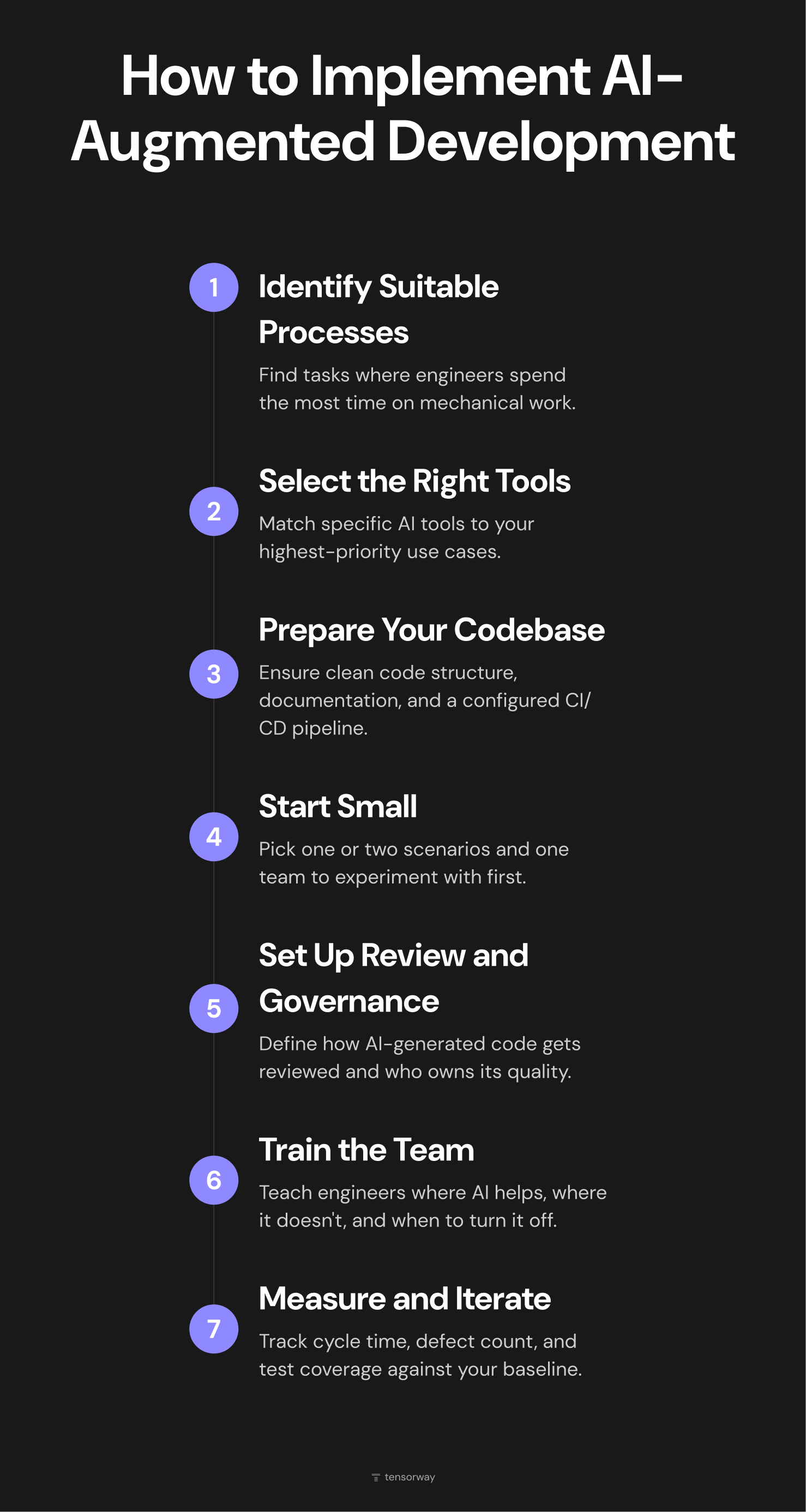
1. Identify processes suitable for AI augmentation
Look at the team's daily work and find tasks where engineers spend a disproportionate amount of time on mechanical work. Writing boilerplate, manual testing, documentation that nobody wants to update. Start with whatever hurts the most and where the cost of AI getting it wrong is lowest.
2. Select tools for specific tasks
There is no single AI tool that covers everything. Copilot works well for code completion, Amazon CodeGuru for code review, ChatGPT and Claude for documentation and planning. Put together a short list based on your priorities from step one and don't try to roll out five tools at once.
3. Prepare your codebase and environment
AI tools perform better when code is well structured and there's enough context to work with. Make sure the repository is in good shape, basic documentation exists, and the CI/CD pipeline is configured. Without that foundation, AI will generate code that matches the quality of what's already sitting in the repo.
4. Integrate AI into daily workflows, starting small
Don't roll AI out across the entire project and the whole team at once. Pick one or two scenarios, one team, or even a single engineer who's willing to experiment. Two to three weeks is enough to gather initial observations and real feedback.
5. Establish review and governance processes
Define how AI-generated code goes through review. Who owns its quality? Is there a separate checklist for reviewing AI code? Does security scanning run automatically? These questions are better answered before AI-generated code starts flowing into production at scale. Teams offering AI augmented development services typically build this governance layer in from the beginning.
6. Train the team to work with AI deliberately
Engineers need to understand where AI is strong, where it's weak, how to write prompts that produce better results, and when to turn off suggestions and write the code themselves. Pay extra attention to juniors, where the risk of AI dependency is highest.
7. Measure results and iterate
Track specific metrics: cycle time, defect count, time spent on code review, test coverage. Compare against the baseline from before implementation. If AI isn't improving things at some stage or is making metrics worse, adjust the configuration, switch tools, or drop AI from that particular process. A good ai-augmented software development company will help you set up this measurement framework early so decisions are based on data rather than assumptions.
Trends Shaping AI-Augmented Development
Two years ago, AI in development mostly meant code completion. The tool suggests the next line, the developer accepts or rejects. Now the industry is moving toward agentic AI, where the model doesn't just suggest but executes entire tasks with minimal oversight. An AI agent receives a task description, analyzes the codebase on its own, writes the implementation, generates tests, and creates a pull request. The human steps in at review. According to Gartner, by 2028 33% of enterprise software will include agentic AI, and 15% of day-to-day work decisions will be made autonomously. At the same time, Gartner warns that over 40% of agentic AI projects will be canceled by the end of 2027 due to unclear business cases or insufficient risk controls.
The geography of adoption is shifting in parallel. AI-augmented software development is moving beyond classic tech companies. According to a Menlo Ventures report, vertical AI became a $3.5 billion category in 2025, tripling investment volume compared to the previous year. Financial services, healthcare, legal, retail, all of these industries are building internal products and running into the same problems: not enough developers, slow releases, growing technical debt. AI is becoming their way to scale engineering capacity without proportionally growing the team.
The third trend taking shape right now is governance and responsible AI in the context of development. The more code AI generates, the sharper the questions around accountability, transparency, and quality control become. The EU AI Act is already in force, and rules for high-risk AI systems will become fully mandatory by August 2027. Companies are starting to put internal policies in place: what can be handed off to AI, how to label generated code, which quality metrics to apply. According to the Diligent Institute, 60% of compliance and audit leaders now cite technology as their top risk concern, yet only 29% of organizations have a comprehensive AI governance plan.
Final Thoughts
Thousands of teams use AI-augmented development every day, and for most of them it's simply part of how they work. But the results depend less on which tool you plug in and more on how you embed it into your processes, how you train your team to work with it, and where you deliberately choose not to use it. If you're considering bringing AI into your development workflow and want to do it with a clear plan and measurable outcomes, get in touch. At Tensorway, we help product teams integrate AI where it genuinely delivers and builds processes so the technology works for your team, not the other way around.