
TL;DR
- For Liner Legal, Tensorway automated medical document processing in 5-15 minutes, producing summaries linked to original records. This timing excludes legal review.
- AI document automation can support drafting, clause extraction, version comparison, and document assembly.
- Lawyers remain responsible for checking the output, making legal judgments, and approving the final work.
- Clio Draft, Spellbook, Harvey, and EvenUp address different document tasks. Check whether an existing product fits your workflow before commissioning custom development.
- Test solutions on familiar documents. Measure missed information, corrections, and review time alongside processing speed.
Tensorway helped Liner Legal automate the processing of medical records that could run to more than a thousand pages. Previously, the firm reviewed them manually. Staff had to reconstruct treatment histories and find details relevant to each case. The system we built produces structured summaries with links to specific pages in the original documents. A lawyer can open the relevant passage and check the information against its source.
An AI agent for document automation carries out a sequence of related tasks within an agreed scope. For example, it can find information in case files and use it to prepare a draft for review. When comparing legal AI tools, ask the provider to demonstrate that full sequence using your documents.
In Wolters Kluwer’s 2026 survey, 92% of legal professionals surveyed reported using AI in their daily work. Clio also reports widespread adoption among mid-sized law firms. Our work with Liner Legal takes us from those broad figures to a specific document workflow. We’ll look at the steps we automated, how to verify the results, and which decisions remain with a lawyer.
How Did We Automate Document Processing for Liner Legal?
We built a Medical Summary for Liner Legal to turn medical records into structured case materials. Our work with the firm began with this module in January 2025.
Records for one client could exceed 1,000 pages of scans and handwritten notes. Lawyers spent a full working week manually sorting and processing the documents for a single case.
How Did We Build the Document Processing Workflow?
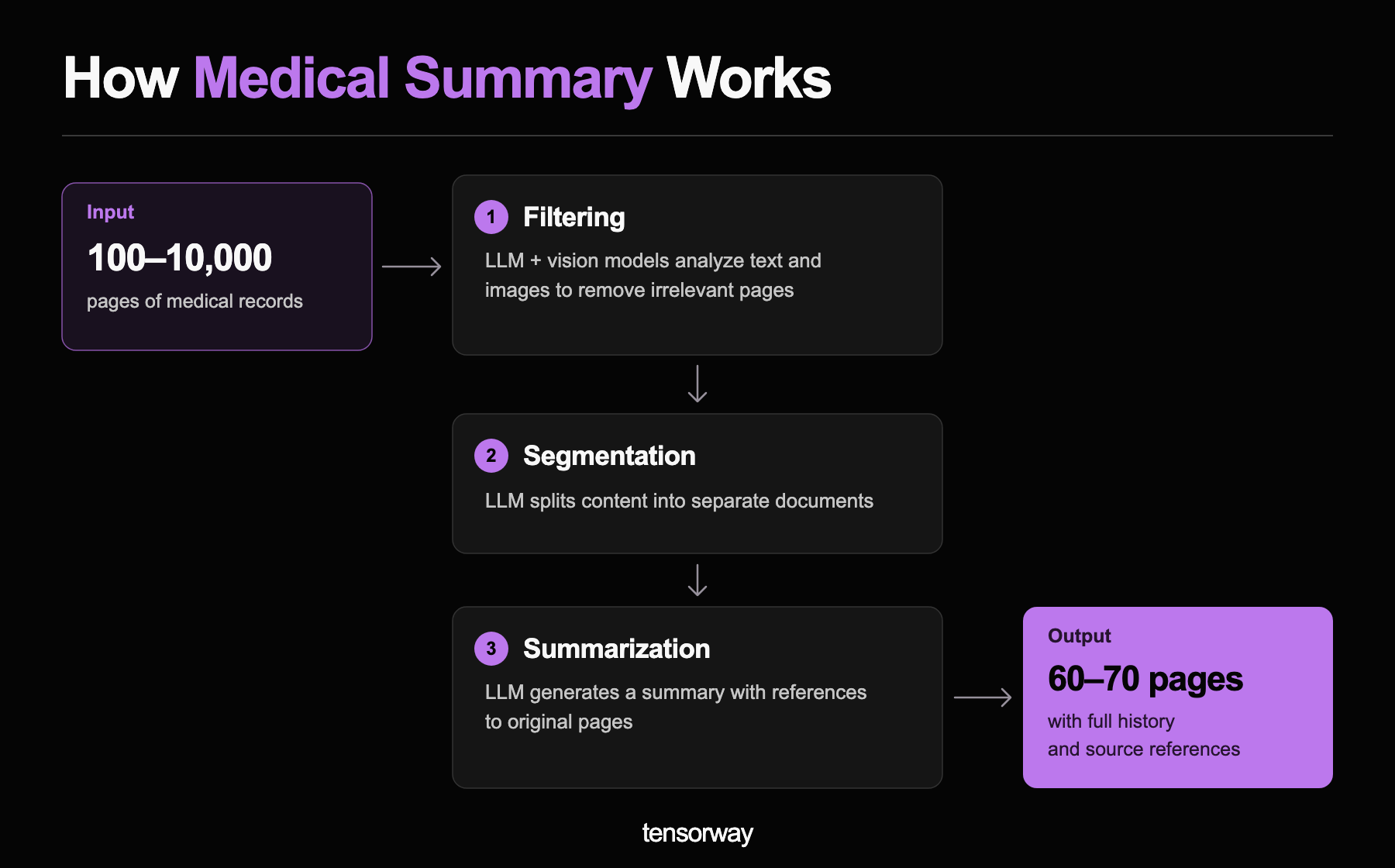
We combined computer vision and large language models in a two-stage process:
- Text recognition. Computer vision models divide documents into sections and convert scans, stamps, and handwritten medical notes into text.
- Structuring. Language models organize the extracted information chronologically, with details of diagnoses, physicians, and healthcare facilities.
How Did We Make the Results Verifiable?
We linked every summary entry to its source. Clicking a link opens the relevant PDF page and highlights the supporting sentence. Lawyers can compare the information directly with the original.
What Changed for Liner Legal?
Automated processing of large documents takes 5-15 minutes. The figure in our case study refers specifically to the system’s processing time.
After launching Medical Summary, we added tools to detect gaps in medical histories. The system cross-references providers and treatment periods to flag missing records, helping the team check completeness and request additional evidence before a hearing.
What Can AI Document Automation Handle in Legal Work?
AI agents can process source documents, extract relevant information, and prepare drafts according to agreed rules. For recurring forms and letters, legal document generation software can assemble drafts from approved templates and client details. A useful starting point is a task where your team can define a correct result and explain how to check it.
For Liner Legal, we built a system that organizes medical records and helps identify gaps in case materials. Both workflows are described in our case study. Contract work requires its own setup, including approved templates, a clause library, and review rules.
The table outlines tasks an agent can handle and the checks a lawyer should make.
The lawyer remains responsible for the work performed on the client’s behalf. An agent’s analysis or draft can provide a starting point, but decisions requiring professional judgment must remain with the lawyer.
How Should Legal Teams Review Documents Prepared by Legal AI Tools?
Legal workflow automation can incorporate the review process your team already uses. If your team works in legal document management software, plan how reviewers will access both the generated draft and its source files. The extent of review depends on the document’s purpose and the consequences of an error.
For example, before an agent drafts a contract termination notice, a lawyer should check the grounds for termination, notice periods, and delivery requirements. If the agent misinterprets any of these terms, the error will carry through to the draft. This makes the extracted information a useful checkpoint before drafting begins.
For each document type, identify what needs attention:
- Facts. Names, amounts, dates, and circumstances that the text relies on.
- Legal provisions. Whether definitions, exceptions, and related terms have been taken into account. A clause may appear straightforward until the lawyer opens a schedule or follows a cross-reference.
- Sources. Whether the cited references exist and support the statements made.
A designated lawyer should approve a specific version of the document. If the agent changes its substance after approval, the revised text should go back for review.
Keeping source materials and revision histories alongside the document in your legal document management software makes it easier to trace how a particular passage was developed. Verifying sources and tracking changes to generated content are also recommended in NIST’s Generative AI Profile, published in July 2024.
Which Ready-Made Tools Can Automate Legal Document Work?
As of September 2026, Clio Draft, Spellbook, Harvey, and EvenUp offer ready-made solutions for different document tasks. These legal AI tools cover work ranging from assembling standard forms to analyzing medical histories. The comparison below summarizes their published capabilities and suggests where each may fit.
Practice area matters here. EvenUp’s medical chronology offering is designed for personal injury work; a disability practice would need to test whether its output suits the evidence required for its cases.
There is also room to adapt an existing platform. Harvey’s Agent Builder, for example, lets teams create agents around their own knowledge and instructions, with connectors providing access to other systems.
Before commissioning custom development, ask vendors to demonstrate your actual workflow. Identify any requirements that remain unmet after configuration: a source system they cannot access, a required document structure, or an approval step they cannot support. Those specific gaps give you a basis for deciding whether additional development is justified.
How Do You Choose the Best Legal Document Automation Software?
The right choice depends on what slows your team down. Preparing standard documents, reviewing contracts, and transferring data between systems require different capabilities. Before comparing products, describe one process you want to improve, from receiving the source materials to approving the final result.
To find the best AI agents for law firms with requirements like yours, test each candidate on the same set of documents. Use materials whose details your team already knows. Include routine files and more difficult examples: a contract with an exception buried in a schedule, several versions of the same file, or a poor-quality scan. Before sharing materials, agree on how they will be processed.
If much of your work begins with scans, assess optical character recognition, or OCR, separately. An incorrectly recognized amount or date can affect the result before legal analysis even begins.
During the test, record missed clauses, false alerts, and the time lawyers spend making corrections. With AI contract review software, check whether lawyers accept the proposed redlines or have to rewrite them. For broader legal workflow automation, include the time spent moving documents between systems and routing them for approval. Account for template setup, integrations, and ongoing support when comparing costs.
Conclusion
For Liner Legal, we automated medical record processing and linked the resulting case materials to their original sources. Lawyers receive an organized case history and can open the document behind each entry. That is a practical goal for AI legal document automation: preparing materials your team can use and verify.
Start with one process that regularly takes up your team’s time. Test the solution on familiar documents, accounting for corrections and the time spent on legal review. This will help you decide whether the tool is ready for everyday use and which tasks to automate next.
Tell the Tensorway team about your workflow to discuss which steps can be automated and how to check the results.

.jpg)