TL;DR
- Agentic AI workflow automation uses AI agents that reason about each step, pick which tool to call, and adapt when a step fails, rather than following a fixed script.
- The line, per Anthropic: workflows run on predefined code paths; agents dynamically direct their own process and tool use.
- Under the hood: an orchestration layer routes steps, tools touch real systems, and persistent state lets a pipeline resume after a failure instead of restarting.
- Single-agent suits linear workflows; multi-agent suits parallel or specialized steps, at higher cost and latency.
- Build order: map the process first, match the architecture to it, test each tool in isolation, add human checkpoints only where error is costly, and log everything.
- Most failures come from weak handoffs between steps, not the model: silent failures, unbounded retries, over-permissioning, and lost context.
Agentic workflow automation is automation where AI agents reason about each step, decide which tool or system to call, and recover when a step fails, instead of executing a rigid script. It is a different class from RPA and rule-based automation.
The problem it solves is specific: processes that need judgment, exception handling, and coordination across several systems, which is exactly what scripted automation cannot manage. RPA is excellent at clicking the same buttons in the same order, and it breaks the moment an input format changes or a case shows up that wasn't in the script.
This article explains how agentic pipelines work under the hood, how to build one, and where they already run in production.
What Is Agentic Workflow Automation?
Agentic workflow automation uses AI agents that reason about each step, decide which tool to call, and adapt when a step fails, instead of following a fixed script.
The core distinction is one thing. Rule-based automation (RPA) executes fixed steps. An agentic pipeline reasons, decides, and recovers. Anthropic draws the line cleanly: workflows are systems where LLMs and tools are orchestrated through predefined code paths; agents are systems where LLMs dynamically direct their own processes and tool usage. If you are weighing the two ends of this spectrum, our breakdown of intelligent process automation versus RPA maps out where each one fits.
The key properties of an agentic pipeline: goal-directed execution, tool and API calls, exception handling, and state carried across steps. Behind this sits the ReAct pattern (reasoning plus action) where the model generates reasoning traces and actions in an interleaved way rather than separately.
The one-line contrast: RPA breaks when the UI or input format changes; an agent adapts because it reasons about the goal, not just the steps.
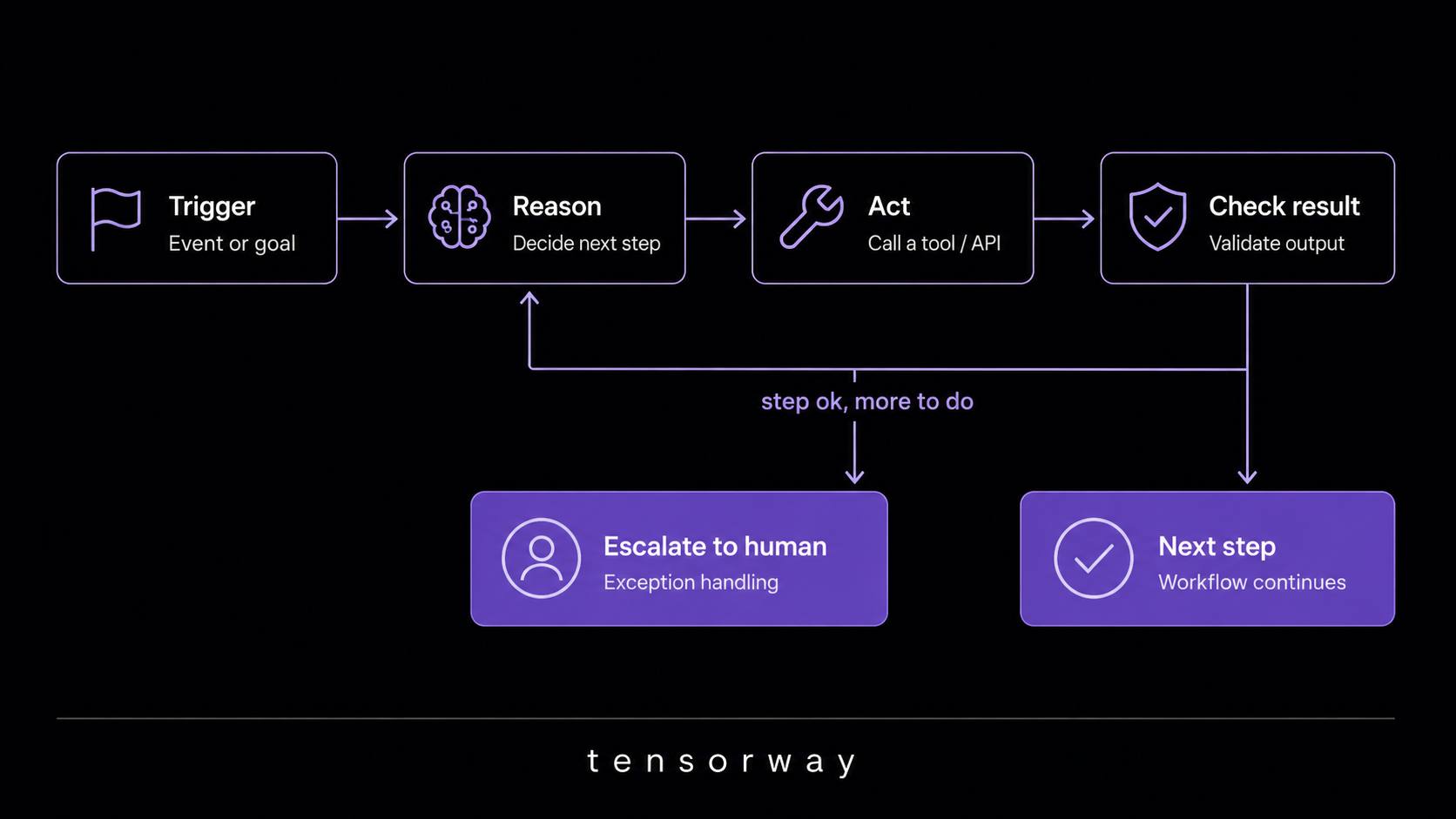
In practice, we at Tensorway advise against reading this distinction as “agents beat RPA.” They don't. For a process that never changes and has no exceptions, RPA is cheaper, faster, and more predictable. An agentic pipeline earns its place exactly where the script breaks: when inputs arrive in ten different formats, when a share of cases has to be escalated to a person, when a step can fail and needs a different path. The question is not which is more powerful, but whether the process has judgment and exceptions in it.
RPA vs agentic workflow automation
How Do Agentic Pipelines Work Under the Hood?
Orchestration and tool use
Under the hood, an agentic pipeline rests on an ai orchestration layer that decides which agent or tool handles each step and routes its output to the next. It is the conductor that sets the order and the path the data takes.
Tools are how the pipeline touches the real world: APIs, databases, internal systems. Without them, an agent only generates text; with them, it takes action. A concrete workflow orchestration framework is LangGraph, which represents a workflow as a stateful graph where nodes are functions and edges define the flow of execution .
Pipelines come in two shapes. A single-agent pipeline has one agent run the whole workflow end to end. A multi-agent pipeline has a coordinator delegate work to specialist agents, each responsible for its own part. Anthropic describes this second pattern as orchestrator-workers: a central LLM dynamically breaks down the task, delegates it to worker LLMs, and synthesizes their results. This is one form of AI agent orchestration.
The temptation to start with a multi-agent architecture is one of the most common mistakes we see. It looks impressive on a diagram, but every extra agent is one more point of failure and one more channel where context can get lost in a handoff. In our experience, most processes teams label “multi-agent” run perfectly well on a single agent with a well-documented set of tools. Multi-agent is justified when steps are genuinely parallel or need different specializations, not because it feels more current.
Single-agent vs multi-agent pipelines
State and memory across steps
A pipeline needs to remember what happened in step 1 by the time it reaches step 5, and that is state, not just conversation memory. State holds intermediate results, the status of each step, and the data later steps depend on.
Persistent state adds one more thing: the ability to resume after a failure instead of restarting from step one. The mechanism is checkpointing: the pipeline saves its state at checkpoints, so after a crash it continues from the point of failure. LangGraph, for instance, supports checkpointers on in-memory, SQLite, or Postgres.
How Do You Build an Agentic Pipeline for Workflow Automation?
Building an agentic pipeline starts not with picking a framework, but with mapping the current process. This is the practical side of AI-augmented development: the engineering discipline matters more than the model.
- First, map the current workflow in full: every manual step, every decision point, every handoff between people or systems. Until you can see the whole process, any framework is a decision made blind. It is the most tedious stage and the one that most determines the outcome.
- Next, choose the architecture to match the process, not the other way around. A linear, sequential workflow calls for a single-agent pipeline. A process with parallel or specialized steps calls for multi-agent. Don't pull complexity into a place that doesn't need it.
- Build and test each tool integration in isolation. Most pipeline failures trace back to one bad tool call, so test it before wiring it into the wider flow. Anthropic confirms this directly: building their agent for SWE-bench, they spent more time optimizing tools than the prompt itself.
- Add human checkpoints selectively. Put them at the steps with the highest cost of error, not everywhere: over-approving slows the pipeline down without adding safety. Microsoft's catalog of agent design patterns is a useful reference for where these fit.
- And add observability before you ship. Log every step, every tool call, and every decision the agent made. Without it, the first production failure turns into hours of blind debugging.
The advice we repeat to clients more than any other: an agentic pipeline is not “done” when it works on the happy path. It is done when you know what happens when step three returns an error. Teams love to demo a pipeline on a perfect input, then spend months patching it on real data. It is cheaper to design around failure from the start: what escalates, what retries, and what stops the pipeline and calls a human.
AI agent orchestration frameworks
What Are the Real-World Use Cases for Agentic Workflow Automation?
Agentic pipelines already run in production wherever a process is multi-step and has exceptions. These agentic ai use cases share that shape.
- Invoice and finance operations. An agent extracts data from incoming invoices, matches them against purchase orders, flags mismatches, and routes exceptions to a human. Instead of an accountant reconciling hundreds of line items by hand, the pipeline handles the routine and surfaces only what didn't match. At scale, this is as much a data problem as an AI one, which is where big data processing techniques come into play.
- Customer onboarding. An agent pulls data from multiple intake forms, verifies it against internal systems, provisions accounts, and notifies the account team when a step needs manual review. What used to take days of back-and-forth between departments compresses into one flow, with a person involved only on the edge cases.
- IT and DevOps pipelines. An agent monitors deployments, triages failures against known issues, and either resolves or escalates. The r/devops community documents real deployments and honest failure points for pipelines like these, which is worth reading before you build your own.
- Deal sourcing and due diligence. An agent screens incoming opportunities against investment criteria and produces a ranked shortlist instead of manual review. For an investment fund, that is the difference between an analyst reading 5,000 memoranda and an analyst working through a sorted top twenty. These are among the highest-value ai agent use cases in enterprise workflow automation today.
What Are the Biggest Risks When Automating Workflows With AI Agents?
Most pipeline failures come from weak handoffs between steps, not from the model itself.
Silent failures are the most insidious: a step fails without raising an error, and the pipeline carries the bad data forward. The fix is validation at every handoff, not only at the end. Unbounded retries come next — an agent stuck retrying a failing step instead of escalating; always set a retry ceiling. Over-permissioning means giving the pipeline write access to systems it only needs to read from. And context loss between steps happens when state doesn't carry over correctly, so later steps act on stale or incomplete data.
All four risks share one thing: none of them is about how “smart” the model is. They are engineering problems at the seams, which is why a pipeline that worked in a demo breaks in production. The model usually does exactly what it was asked; the wiring around it is what breaks. We treat validation at every handoff, a retry ceiling, and least-privilege access not as best practices but as conditions without which a pipeline should not ship at all.
Conclusion
Agentic pipelines work because they combine reasoning, tool use, and persistent state to run processes fixed scripts cannot. RPA still fits stable, exception-free processes; an agentic pipeline earns its place where judgment and coordination are needed. Map the process, pick the simplest architecture, test tools in isolation, and design around failure. If that sounds like your workflow, contact us and we'll help you scope it.