
TL;DR
- Automated financial data extraction turns invoices, statements, and other documents into structured fields your team can use.
- AI agents can coordinate follow-up work, including finding related records and routing discrepancies for review.
- Tensorway built invoice extraction for Flexidea and a financial analysis workflow for a Swedish private equity firm.
- Predictable tasks may need only a predefined workflow. Agents add flexibility when the next step depends on the results.
- Test one process on familiar documents. Measure critical-field accuracy and total processing time, including corrections and transfer into your accounting system.
Matching an invoice to a purchase order often starts with copying data from a PDF into the accounting system. Entering the total is straightforward. Working through several pages of line items, discounts, and different tax rates takes longer, especially when the totals don’t match after entry.
According to IFOL’s 2025 research, 66% of surveyed accounts payable teams still enter invoice data into their ERP systems manually.
Automated financial data extraction can populate the required fields from source documents. An AI agent can then find the corresponding purchase order and run predefined checks. If the amounts differ, the accountant receives the discrepancy with links to the supporting documents. Using this example, we’ll look at how to connect extraction with validation and transfer the results into your accounting system.
How Does Tensorway Automate Financial Document Processing?
We built an invoice extraction model for Flexidea and a system of agents for a Swedish private equity firm managing multibillion-euro funds. The latter prepares data for investment evaluations and reports.
How Did We Automate Invoice Data Extraction for Flexidea?
In our Flexidea project, the goal was to populate fields automatically with information from uploaded invoices. The client’s document set contained 9,604 files, including readable PDFs, photographs, scans, and other formats. Most documents were in Latvian or English.
Our team developed a machine learning model to identify relevant text and determine which fields it belonged to, such as invoice numbers and company names. For Latvian invoices, we built a specialized named entity recognition (NER) model to account for the language’s grammar and vocabulary.
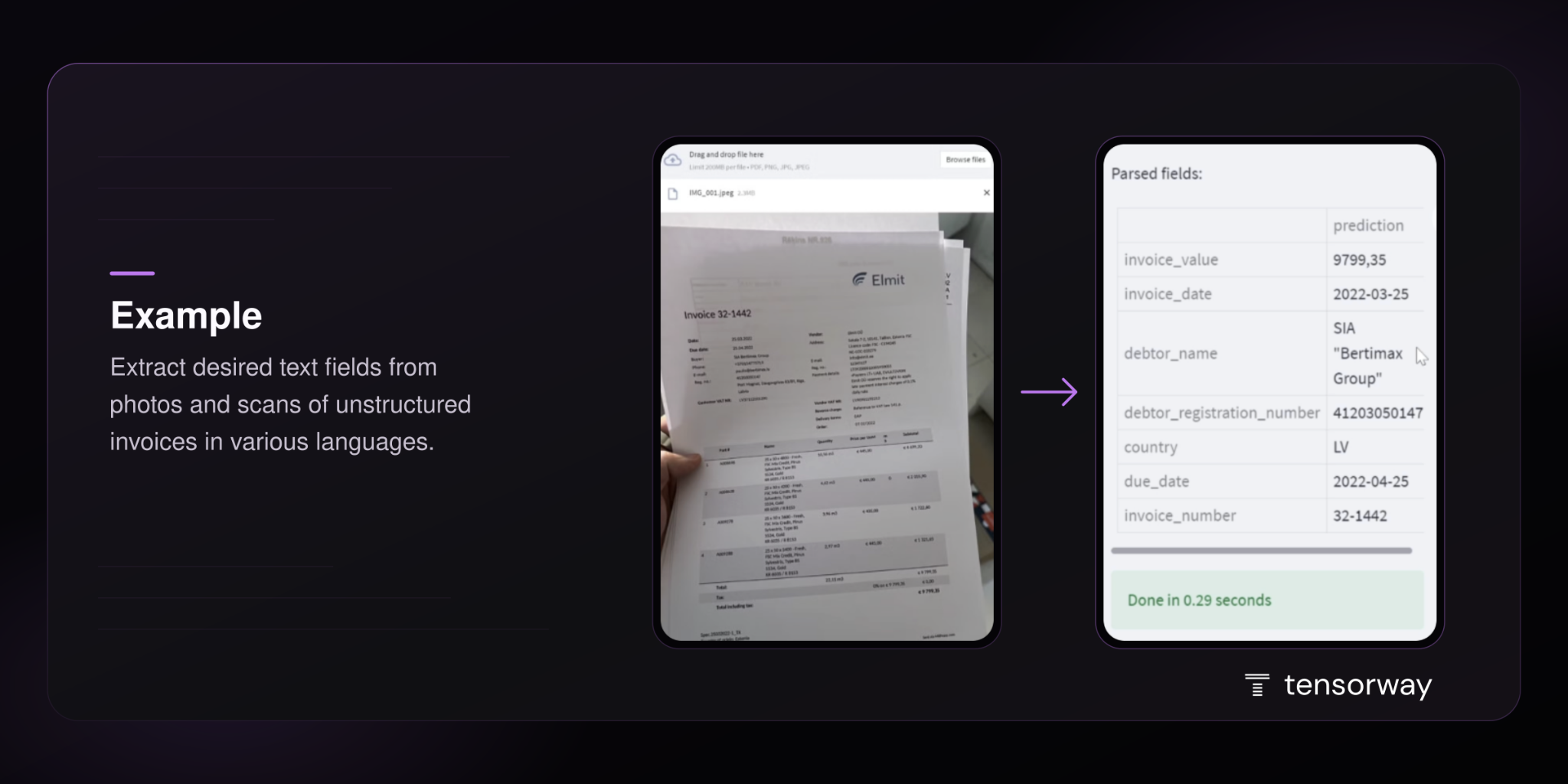
Users could correct the extracted values, and we used those corrections to refine the model. Poor scan quality and documents containing multiple languages required further work from the team.
Our guide to AI powered data extraction explains how we train models to extract specific document fields and integrate them into existing systems. Watch our video on financial data extraction for a closer look at Tensorway’s approach.
How Does a PE Fund Use Financial Data in an Agent Workflow?
For the Stockholm-based private equity firm, we built a system that helps identify and assess potential investments. The information needed for this work was spread across internal documents, financial databases, CRM systems, and other sources.
We assigned different tasks to specialized agents:
- Financial Extraction Agent extracts financial metrics and historical performance data from annual reports, earnings presentations, and regulatory filings.
- Evaluation Agent applies the firm’s assessment methodology and produces standardized comparison tables.
- Report Agent brings findings from different sources together in reports that follow the firm’s templates.
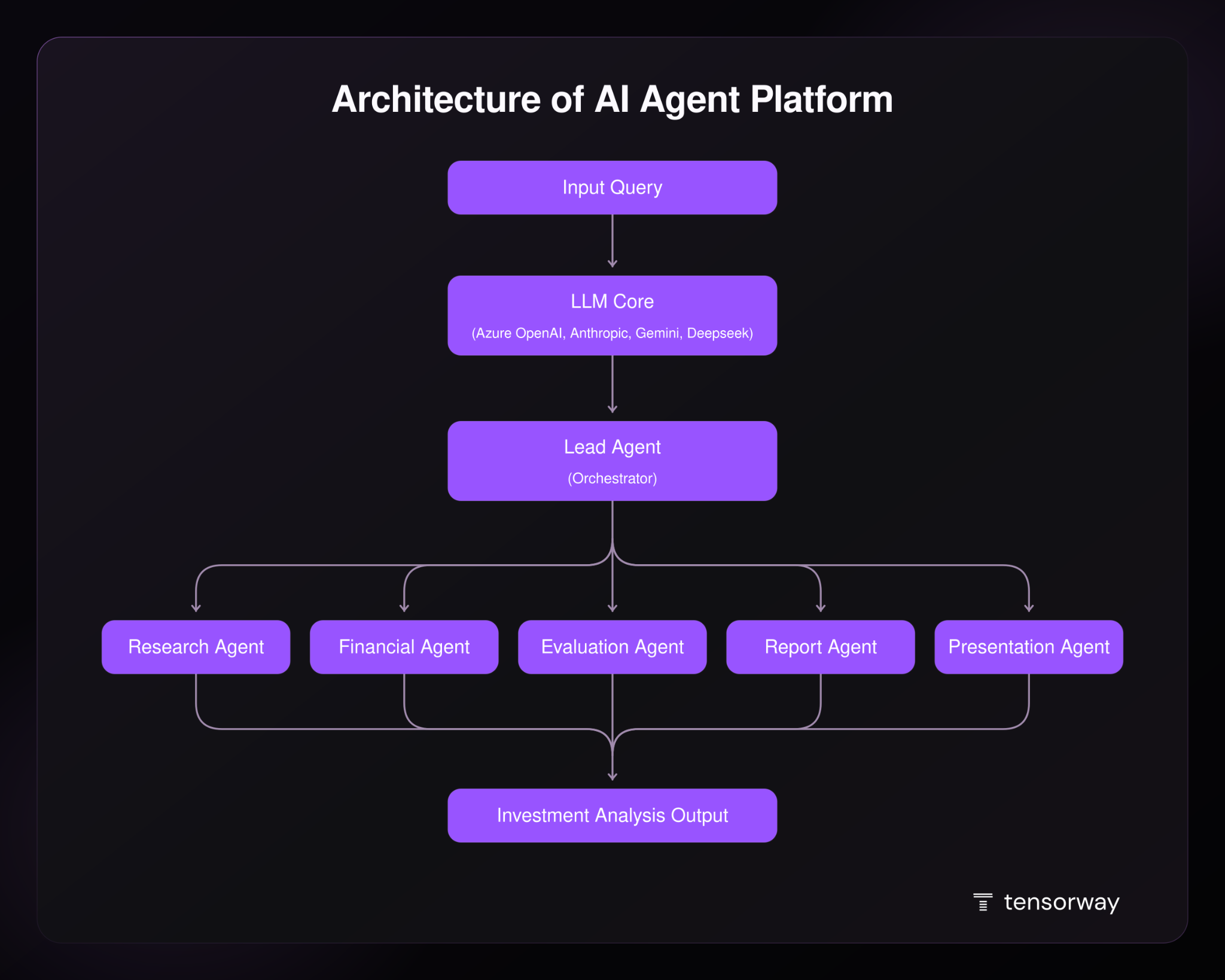
A lead agent assigns tasks in response to the user’s request, connecting extraction with the analytical work that follows.
How Do AI Agents Process Financial Documents Beyond OCR?
AI agents for finance can use extracted invoice data to find the corresponding purchase order and prepare the invoice for approval. This requires access to the accounting system and clear rules for handling discrepancies.
Several technologies can work together in financial document processing:
Validation and human review are already available in intelligent document processing systems. UiPath, for example, combines data extraction with RPA and user verification. Whether an agent adds value depends on how much flexibility the process needs.
Consider an invoice with no purchase order number. An agent could search for the order using the supplier and line items. If several orders match, it would send the candidates to an accountant for clarification. Once the match is confirmed, it could run a programmed check of the amounts and attach the results to the invoice.
In its guide published in December 2024, Anthropic distinguishes between predefined workflows and agents. In a workflow, code determines the sequence of steps. An agent uses the results of each action to decide which available tool to use next and whether it needs more information. It can also pause for human input when it reaches a decision it cannot resolve.
That distinction helps determine what to build. Anthropic recommends starting with the simplest approach that meets the task’s requirements. A predictable sequence of checks may work well as a predefined workflow. An agent offers more flexibility, but also introduces additional cost and opportunities for errors to carry through several steps. Its value needs to be tested against a simpler solution.
When planning document processing automation, identify where that flexibility would help your team. During AI agent development, define which tools the agent can use and the conditions under which it must stop and ask a person.
How Do You Start Automating Financial Data Extraction?
Start with a workflow you can test against documents your team has already processed. For example, use invoices from a previous accounting period to see how much work the system can complete before an accountant needs to step in.
Step 1. Define the required output
Extracting data from a PDF is too broad a goal for comparing financial data extraction software. Specify what your team needs to receive, such as a draft entry in the accounting system with the supplier, invoice number, currency, and amount populated.
This determines the scope of the test. If an accountant still spends half an hour preparing the extracted data for import, that work needs to count too.
Step 2. Test documents with different levels of difficulty
Use files your team encounters in its daily work:
- routine invoices from regular suppliers;
- documents that need closer attention, such as poor-quality scans, multipage tables, or invoices with several tax rates;
- incomplete invoices with missing details or pages.
Prepare verified values for each document. When information is absent, the expected result should be a flagged empty field or a request for clarification. Set aside some files for the final evaluation so you can test the solution on documents that were not used during configuration.
Step 3. Measure the work left for your team
An overall accuracy score can hide errors that matter to an accountant. A system might extract dozens of line items correctly but assign the wrong currency to the entire invoice.
Compare these results with your current process using similar documents.
Step 4. Test the transfer into your accounting system
Complete the test by creating draft entries in the accounting system. Check that values reach the correct fields and that uploading the same invoice again does not create a duplicate. An invoice with a discrepancy should reach a designated team member with an explanation of what needs checking.
The question of what happens after extraction also came up in a discussion on r/Bookkeeping. Responding to an invoice export tool, one participant asked what users would do with the resulting spreadsheet. Another emphasized the need for ERP integration. These are individual comments, but they illustrate why data transfer belongs in the test.
If the next stage of financial data automation involves reconciling information across systems, our article on AI agents in finance covers additional use cases.
Conclusion
Automated financial data extraction should leave your team with less work between receiving a document and using its data. Judge the result after corrections and review, with the information in the system where your team needs it.
Contact the Tensorway team to discuss where document processing slows your team down. We’ll help identify a process to automate and define how to test it on your documents.


.jpg)