TL;DR
- OCR extracts text from documents. IDP adds classification, field extraction, validation, and structured output that can be sent directly to an ERP, database, or another system.
- Plain OCR is usually enough for searchable archives and fixed-layout forms. IDP becomes useful when layouts vary, the same fields must be extracted across different documents, or manual data entry is still part of the workflow.
- You do not need to replace your existing OCR engine to introduce IDP. Start with document classification, add extraction logic by document type, set confidence thresholds for human review, and log every validation decision.
- The strongest IDP use cases are document-heavy workflows such as accounts payable, insurance claims, medical records, and contract processing.
OCR itself is no longer the hard part. Tesseract, Amazon Textract, Google Vision, and Azure Read can all pull text from a decent-quality invoice with good accuracy. The problem starts after that. An OCR engine may return every number on the page correctly, but your accounting system still needs to know which one is the invoice total, which one is tax, and which one is just a line item.
Intelligent document processing adds that missing layer. With document classification, field extraction, and validation, OCR output can be turned into data that another system can actually use.
Whether you need that layer depends largely on what happens after OCR. If someone still has to read the output and copy values into another system, there is room for AI document processing. The same is true when layouts keep changing and simple rules become difficult to maintain. In practice, the more variation there is in the document processing pipeline, the harder it becomes to rely on OCR alone.
What Is the Difference Between Intelligent Document Processing and OCR?
Optical character recognition (OCR) recognizes characters in an image and converts them into machine-readable text. It accepts a scan or PDF and outputs lines of text with coordinates, without any understanding of what those lines mean.
Intelligent document processing (IDP) is a pipeline that wraps the OCR pass with document classification, key-value extraction, and validation. AWS defines IDP specifically as automated data extraction from unstructured documents using machine learning, computer vision, and natural language processing. Given the same scan, it outputs a structured dataset with confidence scores, ready to write directly to a database or ERP.
The sequence below follows the AWS reference architecture: document ingestion, OCR, layout analysis, classification, field extraction, and validation.
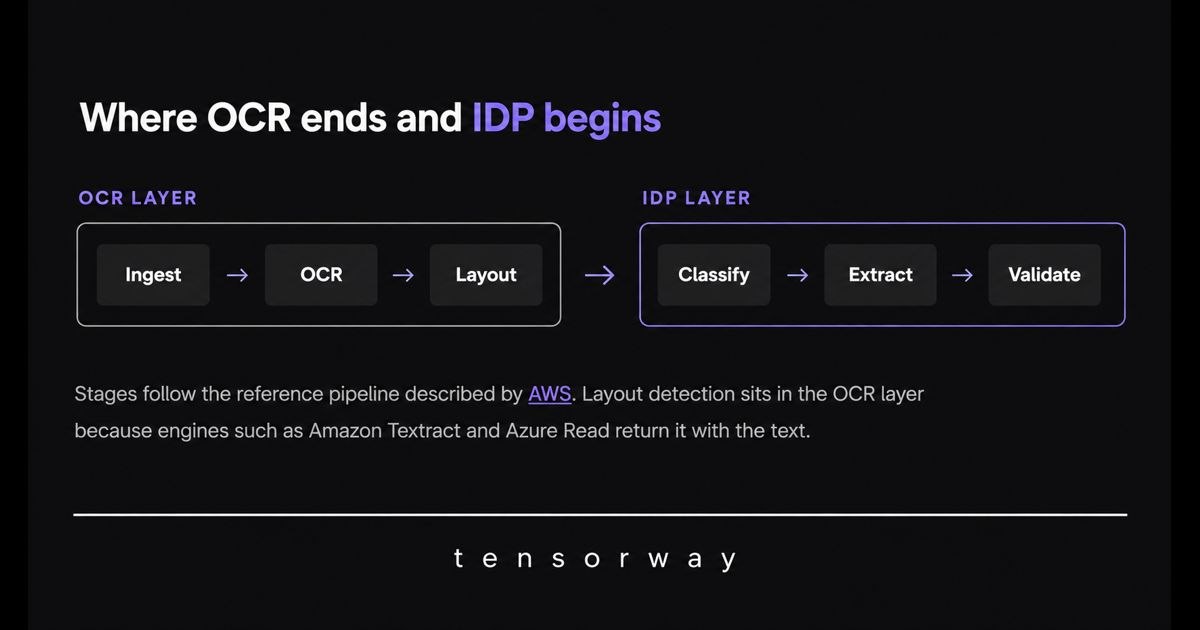
The Core Difference
The key distinction is not recognition accuracy, but context. OCR captures the text correctly, but it does not know that "Total $4,812.00" is an amount due while "Page 1 of 3" is only pagination. IDP operates at the document level. It first identifies the page as an invoice, which tells it to look for a total amount rather than page numbering.
Everything else follows from this distinction. Classification determines document type before extraction. AI document extraction pulls key-value pairs instead of raw text blocks. Contextual understanding validates fields against each other, such as cross-checking line items against the stated total. Confidence scoring flags edge cases for review rather than silently passing incorrect data downstream.
OCR is a well-established technology with predictable behavior and clearly understood limits. IDP adds machine learning, computer vision, and NLP on top of OCR, but its accuracy depends much more on the specific document types, extraction logic, and validation setup used in the pipeline.
In short: OCR digitizes the page. IDP digitizes the process.
When Is Plain OCR Enough, and When Do You Need IDP?
Plain OCR is enough for straightforward digitization when the document layout stays consistent. IDP becomes worth the added complexity once layouts vary, structured extraction is required, or errors carry a meaningful cost.This is unstructured data extraction in the practical sense: the input has no fixed schema, and the output must have one.
Where Is Plain OCR Still Enough?
When the output is meant to be read by a person rather than processed by another system.
Archive digitization is the clearest example. The goal is to make scanned documents searchable, so extracting individual fields is unnecessary. Single-page forms with a fixed layout that has remained unchanged for years can also be handled without IDP. If fields always appear in the same coordinates, positional rules can extract them without machine learning.
These cases have one thing in common: no one needs to take the OCR output and manually enter its data into another system.
When Do You Need IDP?
When document layouts vary but the required data stays the same.
Invoices from multiple suppliers are a common case. The layout may change from one vendor to another, while the required fields stay the same: supplier name, invoice number, total amount, and line items. Insurance claims, contracts, and medical referrals create the same problem. IDP is useful when those documents need to feed structured, validated data into a database, ERP, or another business system.
Here, automated document processing is not about reading documents faster. It is about getting the required data into the system without manual re-entry.
What Does the Trade-Off Look Like?
OCR software is quicker and cheaper to deploy. IDP requires more preparation.
Connecting an OCR technology and extracting text can take days. IDP adds document classification, validation rules, and labeled data for each document type. That extra effort pays off when it reduces the manual work required after OCR. If there is no manual post-processing to begin with, there is little reason to add that complexity.
A practical way to assess your own case is to look at what happens to the OCR output today. If a person simply reads it, OCR is probably enough. If someone takes information from it and enters that data into another system, that is exactly the work IDP can remove.
How Do You Add an IDP Layer on Top of Existing OCR?
Keep the OCR technology you already use and build four capabilities around it: document classification, field extraction for each document type, confidence-based routing to human review, and a complete audit trail of every decision.
The order matters. Classification comes before extraction because it determines which fields the system should look for. Confidence thresholds need to be in place before full automation, otherwise model errors remain hard to spot. Logging should start from day one because an audit trail cannot be reliably reconstructed later.
Step 1. Wrap the OCR Software You Already Have
OCR handles text extraction and structural analysis of tables and key-value pairs, while the language model performs semantic extraction and field mapping.
Adding an IDP layer on top of poor recognition only carries those errors further through the pipeline. If OCR reads “1O0” instead of “100”, the classifier may still confidently map it to the amount field. The quality of the OCR output sets the ceiling for everything that follows.
Managed recognition services are not complete IDP on their own. Commercial intelligent document processing software bundles validation, exception routing, and review interfaces. Build the layer yourself and those parts become your responsibility.
Step 2. Classify Before You Extract
Until the pipeline knows what type of document it is processing, it cannot know which fields to look for. An invoice may require the supplier name, invoice number, and total amount; an insurance claim may require the policy number and incident date.
Step 3. Extract by Document Type
Use a dedicated extraction setup for each document type rather than one universal extractor for everything. A universal approach may look cheaper at first, but it tends to lose accuracy precisely where extraction errors are most costly.
Document classification and field extraction fall within the broader field of computer vision, an area we work with at Tensorway.
Step 4. Set a Confidence Threshold
High-confidence fields can pass through automatically, while low-confidence results are routed to human review. This makes human validation part of the system architecture rather than a fallback used only when something goes wrong.
The goal is not to review every document, but to direct human attention to the cases where it adds the most value.
Step 5. Log Every Extraction and Validation Decision
In financial, healthcare, and legal workflows, a complete audit trail is essential for compliance. You need to know where each value came from, how confident the system was, and who approved or corrected it.
Human corrections should be stored as structured changes that preserve both the original and revised values. Those corrections then become ready-made training signals for the next version of the model.
What Are the Real-World Use Cases for IDP Beyond OCR Technology?
IDP delivers the most value when documents come from multiple sources and feed a system that depends on structured data.
Invoices and Accounts Payable
This is the most common use case and usually the easiest place to start. The required fields stay the same — supplier, invoice number, line items, total — while the layout may differ across hundreds of vendors. The pipeline matches extracted line items against the purchase order, so accountants only need to review invoices where the amounts do not match. We built this type of extraction system for document workflows in our document understanding project.
Insurance Claims
Classification comes first, and the rest of the workflow depends on getting it right. A property claim and a health claim require different sets of fields. If the document is misclassified, the extraction layer will look for the wrong information throughout the file.
Medical Records
Patient intake forms and lab reports often contain handwritten information, so ICR typically works alongside OCR in the same pipeline. Document data extraction turns that content into structured fields. Plain OCR would only return text that a nurse would still need to read and process manually.
Contracts
This is one of the more complex use cases. There are no fixed fields to extract. Instead, the model needs to identify types of clauses and terms, such as contract duration, automatic renewal, and limitation of liability. Both the layout and the wording vary from one counterparty to another, so most of the complexity lies in the NLP layer rather than text recognition itself.
Conclusion
OCR and IDP solve different problems, so the right choice depends on what happens after text extraction. If a person only needs to read the output, OCR is usually enough. If the data must move into an ERP, database, or another system, IDP is the better fit.
Start by mapping your current document flow. Identify which document types you process, which fields need to be extracted, where manual re-entry still happens, and which errors carry the highest cost. From there, add classification, build extraction logic for each document type, and set field-level confidence thresholds before automating the workflow end to end. In most cases, you can keep the OCR engine you already use and build the IDP layer around it.
Not sure where to start? Contact us. We can review your document workflow, identify where OCR is sufficient, and outline where IDP can remove manual work and reduce processing errors.